Monitoring System Access Instructions
Get set up with automatic reporting for hands-off REC generation
Available Instructions
Select a monitoring system above
Click on any available system to view access instructions
Enphase (Enlighten)
Grant access on mobile with the Enphase App or via the Web Portal
Mobile App Instructions
-
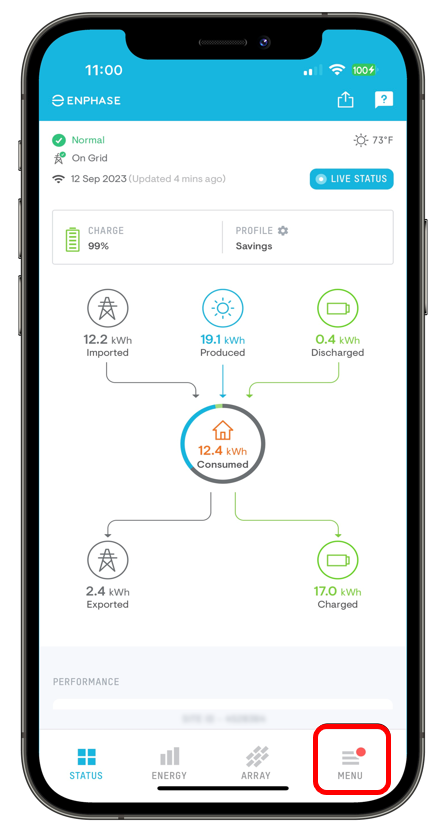
Log in to the Enphase App and select MENU.
-
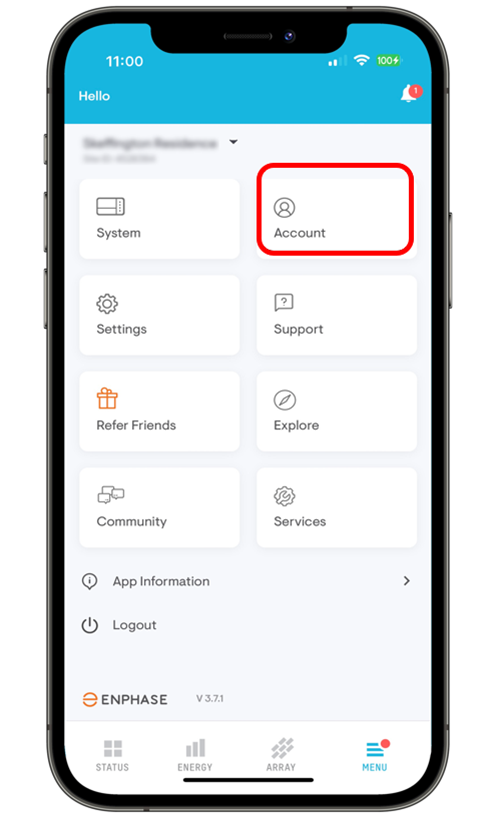
Select Account.
-
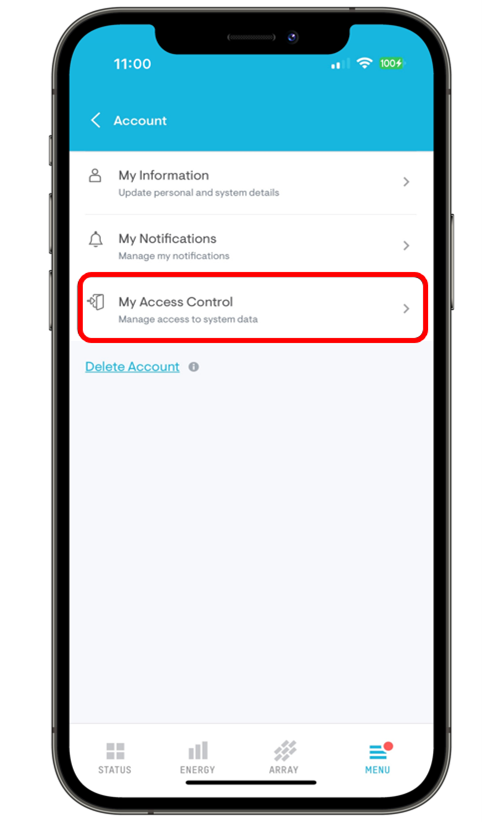
Select My Access Control.
-
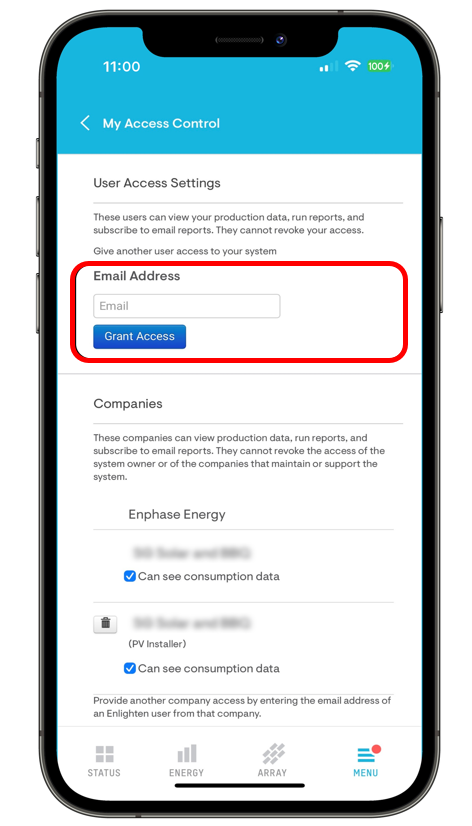
Scroll down to the User Access Settings section, enter info@flettexchange.com and tap Grant Access.
Please contact us once you have completed the above steps so we can confirm access.
See the Official Enphase support guide for more information.
Web Portal Instructions
- Log into your Enlighten account (computer is best but may work on mobile phone)
https://enlighten.enphaseenergy.com - Click this link to configure your Enlighten account to allow us to see your generation:
Grant Access Link - Check the box "My Solar System" and Confirm
- Please reply to our email so we can confirm on our side
"Confirm Access: You do not have permission to grant access to any systems"
Then you will need to contact your installer and have them allow "info@flettexchange.com" access. Once granted, you must approve access via an email from Enphase. Please let us know when completed.
Sunpower (Sunstrong)
Grant access through the Sunstrong mobile app
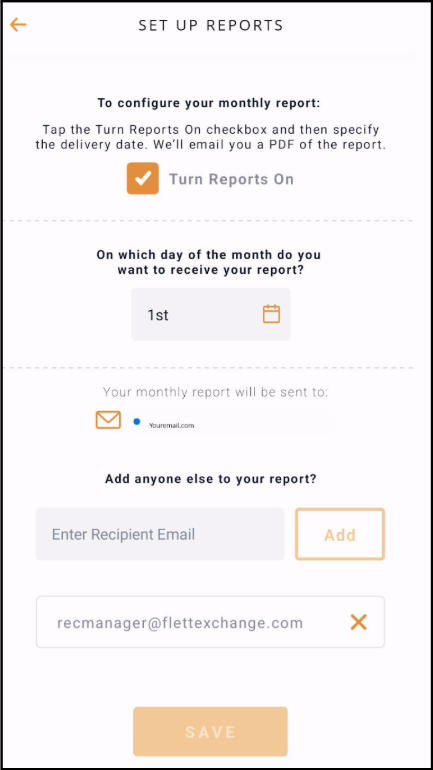
Mobile App Instructions
- Log into the Sunstrong App (Sunpower)
- Click Profile at the bottom, then Reports
- Click the orange "edit" icon (top right)
- Type recmanager@flettexchange.com in "Enter Recipient Email" and click Add
SolarEdge
Please reach out to your Installer
Your installer needs to grant Full Access to jmiles@flettexchange.com through the SolarEdge monitoring portal.
Here is an example message you can send to your installer:
Tesla
Our team at recmanager@flettexchange.com will send you an email requesting your production data.
Please look out for this email and respond with the requested information to complete your monitoring setup.
Sunrun
Our team at recmanager@flettexchange.com will send you an email requesting your production data.
Please look out for this email and respond with the requested information to complete your monitoring setup.
Tigo Energy
Your installer needs to grant system access
With Tigo, only an Installer-level account can grant access to a system. Please contact your installer and ask them to add kflett@flettexchange.com as a user on your system.
Your installer can follow the directions in Tigo's official guide:
Here is an example message you can send to your installer:
Sol-Ark
Requesting system access
Sol-Ark admins can grant Flett Exchange access to your system's production data.
Please contact your installer and ask them to grant access to info@flettexchange.com.
Here is an example message you can send to your installer:
Growatt
Requesting system access
Growatt admins can grant Flett Exchange access to your system's production data.
Please contact Growatt at usaservice@growatt.com and cc fermin.carrillo@growatt.com.
You will need to ask them to grant access to info@flettexchange.com.
Provide your Serial Number (SN) and your Site Name in the email.
To find your Serial Number (SN): Navigate to My Plants > Plant List > Click on your Site Name > Go to the Equipment tab > Find your SN.
Here is an example message you can send to Growatt:
Powertrack
Requesting system access
Powertrack admins can grant Flett Exchange access to your system's production data.
Please contact Powertrack at support@alsoenergy.com and ask them to grant access to recmanager@flettexchange.com.
You will need to provide your Site Name in the email.
Here is an example message you can send to Powertrack:
Locus
Requesting system access
Locus admins can grant Flett Exchange access to your system's production data.
Please contact Locus at support@alsoenergy.com and ask them to grant access to info@flettexchange.com.
You will need to provide your Site Name and Site ID number in the email.
Here is an example message you can send to Locus:
Other Systems
Please contact us for more information on setting up your system for monitoring
Don't see your monitoring system listed here?
Please reach out to us and we'll help you get set up.