SREC Self-Trade Guide
For solar and geothermal owners who manage their own PJM GATS account and trade on Flett Exchange with a Do-It-Yourself (DIY) account.
Two Ways to Sell
For DIY traders with an active PJM GATS account. Log in from flettexchange.com, or at flettexchange.com/portal.
Your Order Is an Ask
Placing a sell order in the portal puts a higher asking price into the market. Sell Now hits the bid.
More per REC if it fills. It can take longer, and a fill is not guaranteed.
Paid at the bid right away. No order and no waiting.
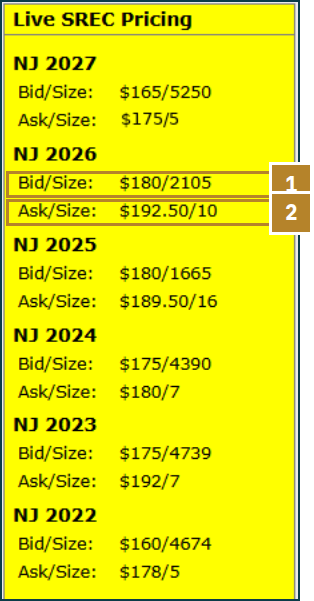
The yellow Live SREC Pricing box on every portal page shows the top bid and the lowest ask, with size, for each energy year in your markets.
-
1
Bid / Size
Price and quantity the desk is buying. The top bid matches the Sell Now price.
-
2
Ask / Size
Lowest price sellers are asking and how many RECs. Your order joins this side.
Place a Sell Order
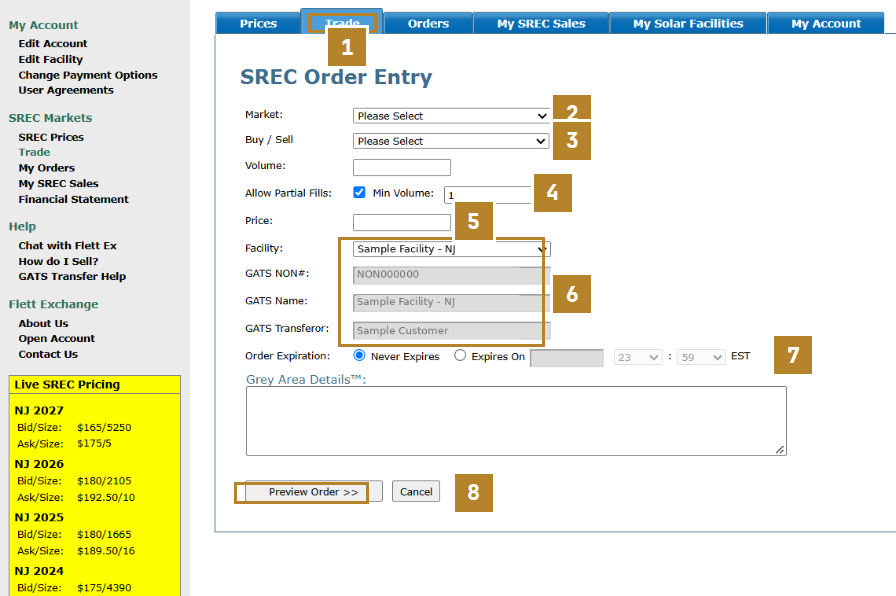
Click LOGIN at the top of flettexchange.com, or go to flettexchange.com/portal. Open Trade and fill in the ticket.
-
1
Trade Tab
Open Trade to get a blank SREC Order Entry ticket.
-
2
Market
Only markets you are permissioned for appear.
-
3
Buy / Sell
Choose Sell.
-
4
Volume + Partial Fills
Number of RECs. Partial fills let the order sell in pieces of at least Min Volume.
-
5
Price
Your ask per REC. Set it above Sell Now.
-
6
Facility
Pick your system. GATS NON#, name and transferor fill in.
-
7
Order Expiration
Never Expires, or an end date and time (EST).
-
8
Preview Order
Check the ticket, then submit.
Each order covers one market and one energy year (vintage). Match it to the RECs in your GATS account.
Your Markets and Prices
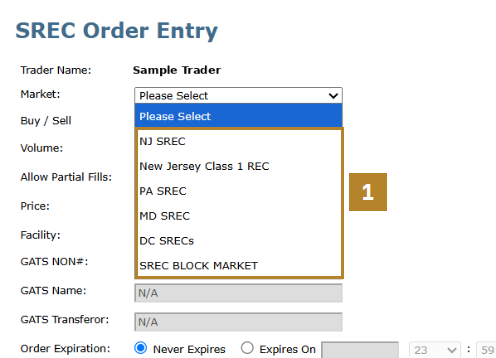
The Market list on your ticket is set up automatically from your application.
-
1
Market List
Example account: NJ SREC, NJ Class I, PA, MD, DC and the SREC Block Market. Yours shows only the markets your system qualifies for.
The desk checks your GATS NON# (Unit ID) and system details from your application, then turns on the markets you can trade. Nothing to request.
-
2
Prices Tab
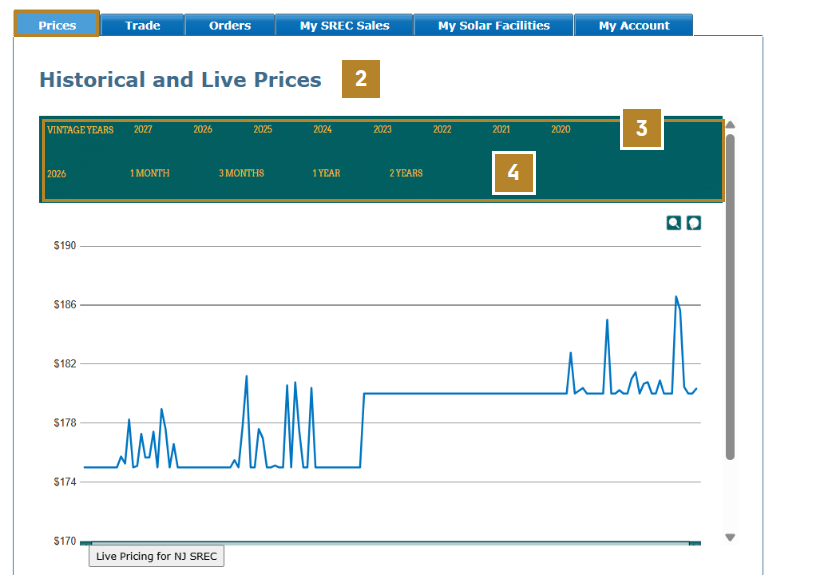
Historical and live prices for your markets.
-
3
Vintage Years
Pick the energy year to chart.
-
4
Range
1 month, 3 months, 1 year or 2 years.
Track Your Orders
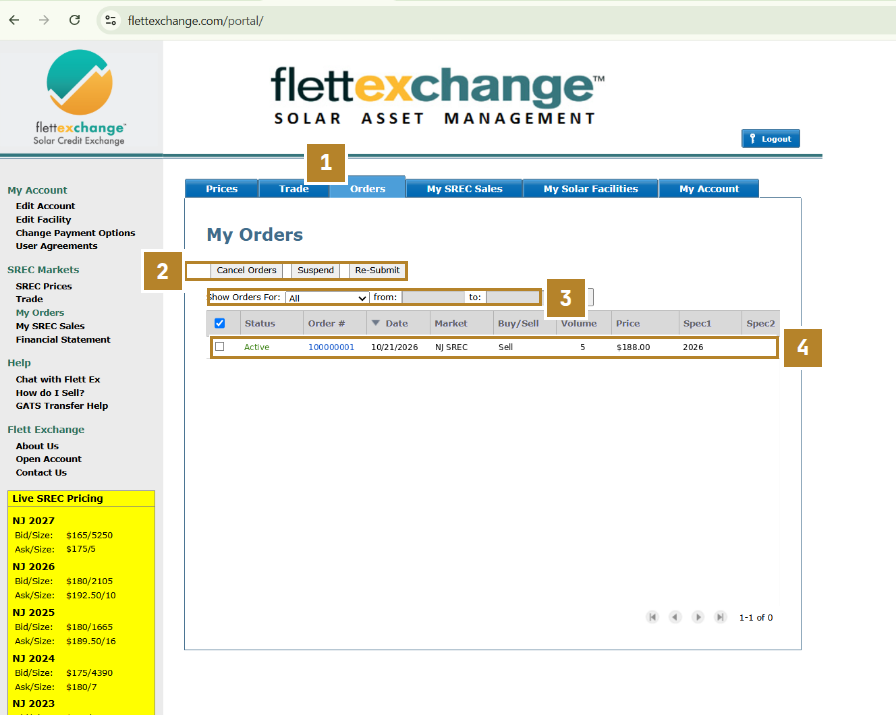
Every ask you have placed, in one list, with its status.
-
1
Orders Tab
Every order you have placed, with status, market, volume, price and energy year (Spec1).
-
2
Cancel · Suspend · Re-Submit
Tick the box next to an order, then cancel, suspend or re-submit it. Unsure which one you need? Ask the desk on live chat.
-
3
Show Orders For
Filter by date range.
-
4
Your Open Ask
Active means it is posted and not filled yet. Do not transfer RECs yet. Wait for the trade confirmation email.
The order row in this screenshot was added for illustration.
After Your Order Sells
Deliver RECs only after the trade confirmation email. Never transfer against an unfilled order.
-
1
Trade Confirmation Email
Sent when your order is lifted in the market (a buyer accepts your ask). This is your signal to deliver.
-
2
Log In to PJM GATS
pjm-eis.com. Certificates, then REC Transfer.
-
3
Pick the Buyer
Another Account Holder: Flett Exchange, LLC. Transfer Type: Spot Market.
-
4
Select RECs
Only the quantity and energy year that sold.
-
5
Enter Your Order Price
Default Price = the price on your trade confirmation email. No $ sign. Review, then Submit.
-
6
Payment
Issued in 1-2 business days by check or direct deposit.
An open order is not a sale. Wait for the trade confirmation email before you deliver any RECs.
-
7
My SREC Sales
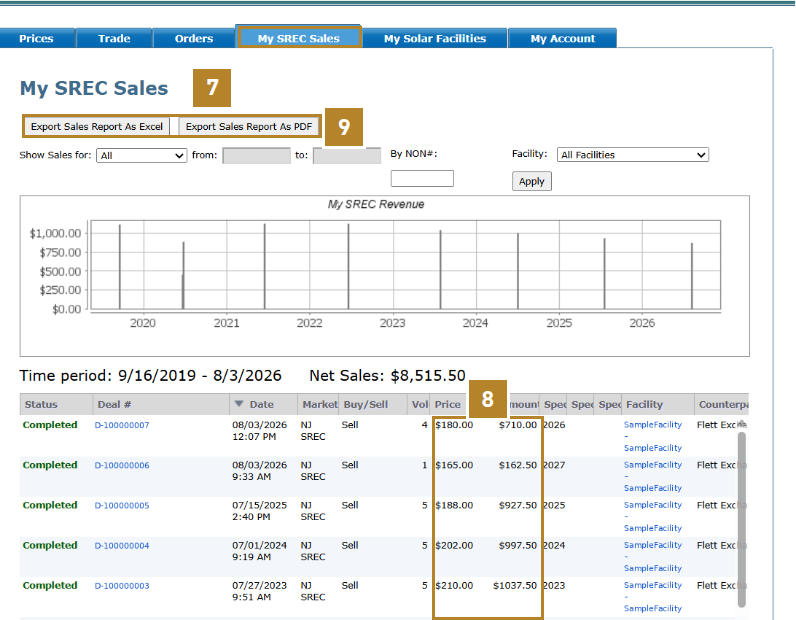
Completed trades by deal.
-
8
Price + Net
Net is after commission.
-
9
Export
Excel or PDF.
Sending RECs Without an Order
Higher prices come from orders, not from the price box in GATS.
| Price typed in GATS | Order on Flett Exchange? | Executes at |
|---|---|---|
| $180.00 (Sell Now) | No | $180.00 · Sell Now |
| $195.00 | No | $180.00 · Sell Now |
| $150.00 | No | $180.00 · Sell Now |
| $188.00 | Yes · open, not filled | Do not transfer yet |
| $188.00 | Yes · lifted, confirmation email received | $188.00 · your order |
Type the current Sell Now price for that market and energy year.
Type the price on your trade confirmation email.
Ask the desk on live chat before you submit the transfer.
You can always send RECs on GATS with no order. It is the fastest way to sell.
Do not transfer at your order price while the order is still open. Deliver only after the trade confirmation email, sent when your order is lifted.
With no matching order, any GATS transfer price that differs from Sell Now is not honored. Those RECs execute at the Flett Exchange Sell Now (spot) price.
Place a sell order first. Deliver only after the trade confirmation email, at your order price.
Talk to the Trading Desk
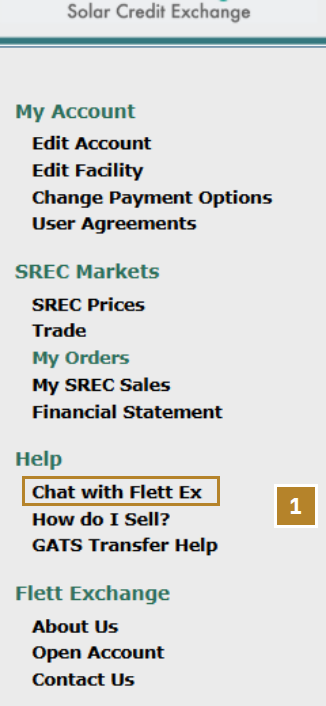
Live chat with a real person on the trading desk, right inside your portal.
-
1
Chat with Flett Ex
Live chat is in the Help menu after you log in. Ask for a member of the trading desk and a real person will pick up during business hours.
-
2
Good Questions for the Desk
Where the market is trading. Whether to place an order or Sell Now. A market missing from your list. A GATS transfer you are unsure about.
-
3
Other Ways to Reach Us
info@flettexchange.com · +1 (201) 209-0234. Help menu also has How do I Sell? and GATS Transfer Help.
Never post account numbers, GATS IDs, bank details or addresses publicly. Use live chat or email.
Screenshots are sample accounts. Names, facilities, GATS and deal numbers are anonymized. Prices shown are examples from October 2026. Check live prices before you trade.
Not an offer to buy or sell any environmental commodity.